
| Course Subject: | NRSG 4604 Community and Public Health Nursing |
| Student Level: | Undergraduate (Prelicensure) |
| Number of Students: | 300 |
| Developed by: | Tiffany Kim, Associate Clinical Professor, School of Nursing, Bouvé College of Health Sciences |
What Instructor Did
With the help of a co-op student (Yash Pankhania–funded by the Provost’s Office), the instructor created AI SimBot, which is a virtual simulation bot that allows students to practice a specific substance abuse screening protocol and develop their communication skills.
NOTE: The next iteration of the SimBot will be upgraded to include a Debriefing Bot using the “Good Judgment” model of feedback. Link to the Debriefing Bot prompt appears at the bottom of this page.
Purpose
The goal of this project was to develop a tool that would allow students to not just learn about the screening protocol, but to improve their skills and confidence by engaging in the back-and-forth dialogue that takes place during patient screening, counseling and referral to treatment. The tool allowed students to practice as often as they liked, whenever they liked, and to receive personalized feedback based on their performance.
Assessment
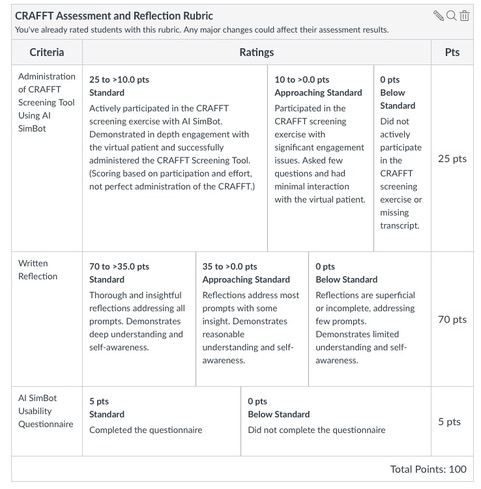
After engaging with the simulated patient, students submitted a transcript of their chat as evidence of their interactions with both the patient and debriefer. Faculty reviewed the transcript and a rubric was leveraged in evaluating their work.
Faculty Reflections
I took very seriously that this chatbot would be “interacting” with my students about potentially very sensitive subjects without my supervision. I needed to feel confident that it was not only capable of the task but would also do no harm. So, as we developed it, we had a small group of graduate nursing students act as a “red team” that tried to dupe, thwart, break, or misdirect the bot, and use their feedback to improve the bot. Based on student reviews from my course this semester, we had very positive results! I also gained some ideas on how to improve the bot’s performance and make it a more believable “adolescent” for future semesters.
Step-by-Step Directions
NOTE: This requires a ChatGPT subscription.
| Step 1 | This requires ChatGPT 4o, so you need to create an account if you don’t have one, and then log in. |
| Step 2 | There are two ways to go about creating your own version of the Simbot:
|
| Step 3 | Practice with the bot, adjusting prompts as you need to. Enlist colleagues to help you test it and encourage them to try to “break” it so that you can learn how to prevent that from happening with your students. |
| Step 4 | Create new or adjust existing instruction and materials to best support the students’ learning while they use the bot. Also, determine what you want them to turn in for accountability, deeper learning, and feedback: for example, the chat transcript and reflection questions about whatever you want to be sure they focus on. |
Related Materials
- Web interface – this custom interface allowed students to access AI SimBot without a ChatGPT 4o subscription.
- CRAFFT Assessment and Reflection Rubric – Rubric used to evaluate students’ interactions with the AI SimBot and their reflections upon it.
- GitHub Repository
- SimBot prompt text
- DebriefingBot prompt text
- ReflectionBot prompt text
Download PDF version of this assignment
Return to AI Gallery Home